Habit Formation with Sliding Windows
The Challenge
You're running a fitness app where users download, try one workout, and disappear forever. Your onboarding data reveals:
- 🏃 Most users complete only 1-2 workouts then churn
- 📉 Habit formation fails - no consistent engagement pattern
- 🎯 Premium conversions are low - users don't see enough value
- 💔 30-day retention is well below industry benchmarks
The question: How do you transform sporadic users into committed fitness enthusiasts with lasting habits?
The Solution: Sliding Window Challenges
The secret to habit formation isn't "do X every single day" - it's flexible consistency. The "In A Time Period" challenge uses a sliding window that moves with the user:
- 🔄 Flexible requirements - "5 workouts in any 7-day period" (not consecutive!)
- 🎯 Achievable goals - users can miss days without losing progress
- 📈 Progressive difficulty - start easy, increase gradually
- 🏆 Habit rewards - unlock features when habits form
When users hit these milestones, triggers fire to unlock premium features, while content deliverables display motivational pop-ups.
In this guide, you'll build a complete habit formation system featuring:
- Sliding window workout tracking
- Invisible triggers for backend automation
- Content deliverables for user engagement
- Progressive habit milestones
What You'll Build
By the end of this guide, you'll have:
- Sliding window challenges that encourage flexible consistency
- Trigger-based automation for premium feature unlocking
- Content deliverables for motivational pop-ups and banners
- Multi-tier habit system from beginner to elite athlete
Apps using sliding window challenges see significantly higher habit formation rates. The flexibility reduces pressure while maintaining consistency, leading to better long-term retention.
Before You Start
Make sure you have:
- ✅ RapidMule account and API key (Get one here)
- ✅ Users registered in RapidMule (via Player API)
- ✅ Action tracking set up for user activities
Setup: Configure Sliding Window Challenge
Before tracking workouts, create a sliding window challenge in your RapidMule dashboard. This is where the magic happens - the window slides with user activity.
Here's how to set up your first sliding window challenge:
- 1. Create Trigger
- 2. Add Deliverables
- 3. Define Condition
Navigate to Triggers (not Badges - triggers are invisible!) and create:
Name: "Habit Formed - Beginner"
Description: "User completed 5 workouts in 7 days"
Type: OneTimeOnly
This trigger fires once when the user forms the habit, unlocking backend features.
Add multiple deliverables to this trigger:
Type: Content
Label: "Habit Formed Celebration"
Deliverable Objects:
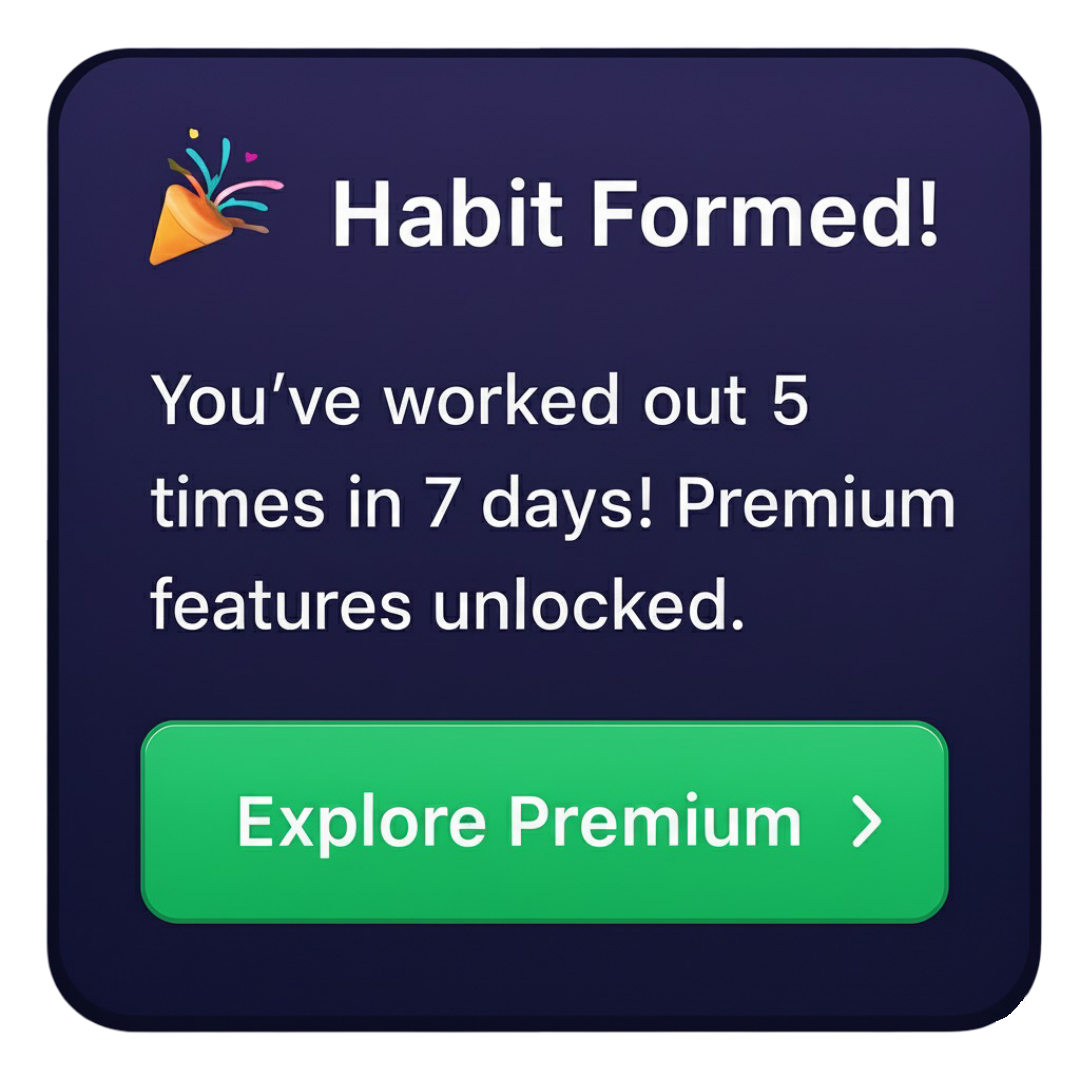
  popup_type: "celebration"
  title: "🎉 Habit Formed!"
  message: "You've worked out 5 times in 7 days! Premium features unlocked."
  cta_button: "Explore Premium"
  cta_link: "https://app.fitnessapp.com/premium"
Type: Notification
Label: "Unlock Premium Features"
Deliverable Objects:
  feature_unlock: "premium_workouts"
  tier: "beginner_habit"
  analytics_event: "habit_milestone_reached"
Type: Prize (Coins)
Label: "Bonus Coins"
Quantity: 100
Deliverable Objects:
  currency: "fitness_coins"
  reason: "habit_formation"
Create the In A Time Period Challenge:
Action Name: "complete_workout"
Challenge Type: "In A Time Period Challenge"
Time Period: 7 days
Second Challenge Type: "Several Times Challenge"
Action Count: 5
How it works: The 7-day window starts with the first workout and slides forward. If the user completes 5 workouts anytime within any 7-day span, the trigger fires!
- "For A Time Period": Fixed dates (Jan 1-31). Miss it, lose it.
- "In A Time Period" (Sliding): Window moves with user. "5 workouts in any 7 days" - much more forgiving!
Step 1: Track First Workout
Sarah downloads your fitness app and completes her first workout. Let's track it:
Understanding Workout Actions
Workout actions include:
- Workout type - Cardio, strength, yoga, etc.
- Duration - How long the session lasted
- Calories burned - Fitness metric
- Difficulty - Beginner, intermediate, advanced
Track first workout - starts the sliding window
What Just Happened?
- ✅ Sarah completed her first workout
- ✅ RapidMule started a 7-day sliding window from this moment
- ✅ She earned 10 points for the workout
- ✅ Progress toward habit: 1/5 workouts
The clock is ticking - but it's flexible! Sarah has 7 days to complete 4 more workouts.
Next Challenge: What if Sarah works out sporadically? Let's see the sliding window in action...
Step 2: Sporadic Workouts (Window Slides!)
Sarah works out again on Day 3, then Day 5, then Day 6. She's not perfect, but she's consistent enough. Watch the sliding window work:
Track 4th workout - getting closer to habit formation
The Sliding Window Timeline:
Day 1: Workout ✅ (window starts)
Day 2: Rest
Day 3: Workout ✅
Day 4: Rest
Day 5: Workout ✅
Day 6: Workout ✅ (4/5 complete - window still valid!)
Day 7: ??? (final day to complete 5th workout)
If Sarah completes one more workout by end of Day 7, the trigger fires! The beauty? She missed Day 2 and 4, but it still counts because the window is flexible.
Next Challenge: Sarah completes her 5th workout. What happens when the habit forms?
Step 3: Habit Formed - Triggers Fire!
It's Day 7. Sarah completes her 5th workout within the 7-day window. This is the moment where everything triggers:
5th workout completes the challenge - triggers fire!
What Just Happened?
- ✅ Trigger fired: "Habit Formed - Beginner" achieved
- ✅ Content deliverable: App displays celebration pop-up with CTA
- ✅ Notification deliverable: Backend unlocks premium workout library
- ✅ Prize deliverable: Sarah receives 100 fitness coins
- ✅ OneTimeOnly: This trigger won't fire again (habit formed!)
Backend Integration:
Your backend receives the Notification deliverable and acts on it:
{
  "type": "Notification",
  "customProperties": {
    "feature_unlock": "premium_workouts",
    "tier": "beginner_habit"
  }
}
Your server:
- Checks Sarah's player profile
- Unlocks premium workout library
- Sends push notification
- Logs analytics event
Frontend Integration:
Your app receives the Content deliverable and displays:
Next Challenge: How do you build progressive habits? Let's add intermediate and advanced tiers...
Step 4: Progressive Habit Tiers
One habit milestone isn't enough. Build a progression system that keeps users engaged long-term:
Dashboard Setup for Advanced Tiers
- Intermediate Tier
- Advanced Tier
- Elite Tier
Name: "Habit Formed - Intermediate"
Type: OneTimeOnly

Deliverables:
  - Content: "Elite Status Unlocked"
  - Notification: "unlock_advanced_analytics"
  - Prize: "200 Fitness Coins"

Condition:
  Action: "complete_workout"
  Challenge: "In A Time Period Challenge"
  Required Count: 10
  Time Period: 14 days
Name: "Habit Formed - Advanced"
Type: OneTimeOnly

Deliverables:
  - Content: "Champion Status Achieved"
  - Notification: "unlock_personal_trainer_ai"
  - Prize: "500 Fitness Coins + Free Premium Month"

Condition:
  Action: "complete_workout"
  Challenge: "In A Time Period Challenge"
  Required Count: 20
  Time Period: 30 days
Name: "Habit Formed - Elite"
Type: OneTimeOnly

Deliverables:
  - Content: "Elite Athlete Recognition"
  - Notification: "unlock_all_premium_features"
  - Prize: "1000 Fitness Coins + Lifetime VIP"

Condition:
  Action: "complete_workout"
  Challenge: "In A Time Period Challenge"
  Required Count: 50
  Time Period: 60 days
Name: "Elite Athlete"
Description: "Completed 50 workouts in 60 days - true dedication!"
Type: OneTimeOnly
Image: Upload elite athlete badge icon
Progressive Habit Journey:
- 🥉 Beginner: 5 workouts in 7 days → Premium workouts unlocked
- 🥈 Intermediate: 10 workouts in 14 days → Advanced analytics unlocked
- 🥇 Advanced: 20 workouts in 30 days → Personal trainer AI unlocked
- 💎 Elite: 50 workouts in 60 days → Lifetime VIP status
Each tier unlocks more value, keeping users engaged for months!
Step 5: Combining Triggers with Badges
Sometimes you want visible recognition along with invisible automation. Combine triggers with badges:
Elite milestone - both trigger AND badge awarded
Why Both?
- Badge (visible): Social recognition, profile display, sharing
- Trigger (invisible): Backend automation, feature unlocks, internal logic
Verification: Check Player Progress
Want to see all of a player's triggers and badges? Use the Player Detail API:
Retrieve complete player data including all triggers and badges
No body required for GET requests
- Badges: Always visible to players, shown in UI
- Triggers: Returned in API but invisible to players, used for backend logic and feature unlocks
What You've Built
Congratulations! You now have a complete habit formation system powered by sliding windows. Let's recap:
🎯 Habit System You Created
- 🏃 User completes 5 workouts in any 7-day span → Beginner habit formed
- 🔥 10 workouts in 14 days → Intermediate tier unlocked
- 💪 20 workouts in 30 days → Advanced analytics activated
- 👑 50 workouts in 60 days → Elite status + lifetime VIP
💡 Key Concepts You Learned
- Sliding Windows ("In A Time Period"): Flexible consistency without strict daily requirements
- Triggers: Invisible achievements that fire backend automation
- Content Deliverables: Display pop-ups, banners, and celebrations to users
- Notification Deliverables: Signal your backend to unlock features, send emails, etc.
- Progressive Tiers: Multiple habit levels that unlock incrementally more value
- Trigger + Badge Combo: Combine visible recognition with invisible automation
📊 Business Impact
With this system, you can now:
- ✅ Form lasting user habits with achievable, flexible goals
- ✅ Unlock premium features automatically based on behavior
- ✅ Display contextual celebrations at perfect moments
- ✅ Build progression systems that retain users for months
- ✅ Combine social proof (badges) with backend logic (triggers)
What's Next?
Explore more engagement strategies:
🎯 Other Gamification Patterns
- E-commerce Purchase Tracking - Reward customer purchases with similar time-based challenges
- Social Engagement Rewards - Apply habit formation to community contributions
- Leaderboard Competitions - Add competitive rankings to habit tracking
📚 Technical Resources
- Player Management API - Track individual player progress and achievements
- Core Concepts - Learn about challenges, triggers, and deliverables
- Actions API - Understand action processing and tracking
Advanced Patterns to Explore
- Habit Streaks: Combine sliding windows with streak bonuses
- Relapse Prevention: Re-trigger notifications if users stop after forming habits
- Difficulty Progression: Require harder workouts for advanced tiers
- Social Habits: "Work out with friends 3 times in 10 days"
- Cross-Action Habits: "5 workouts + 3 meal logs in 7 days"
Need Help?
- 💬 Contact Support - Get help from our team
You've mastered sliding window challenges and trigger-based automation! Your users can now build lasting habits with flexible, achievable goals that unlock real value. 🎉